Clock, periods, half time and full time
Run the match clock, move between periods and mark the breaks.
Match controls
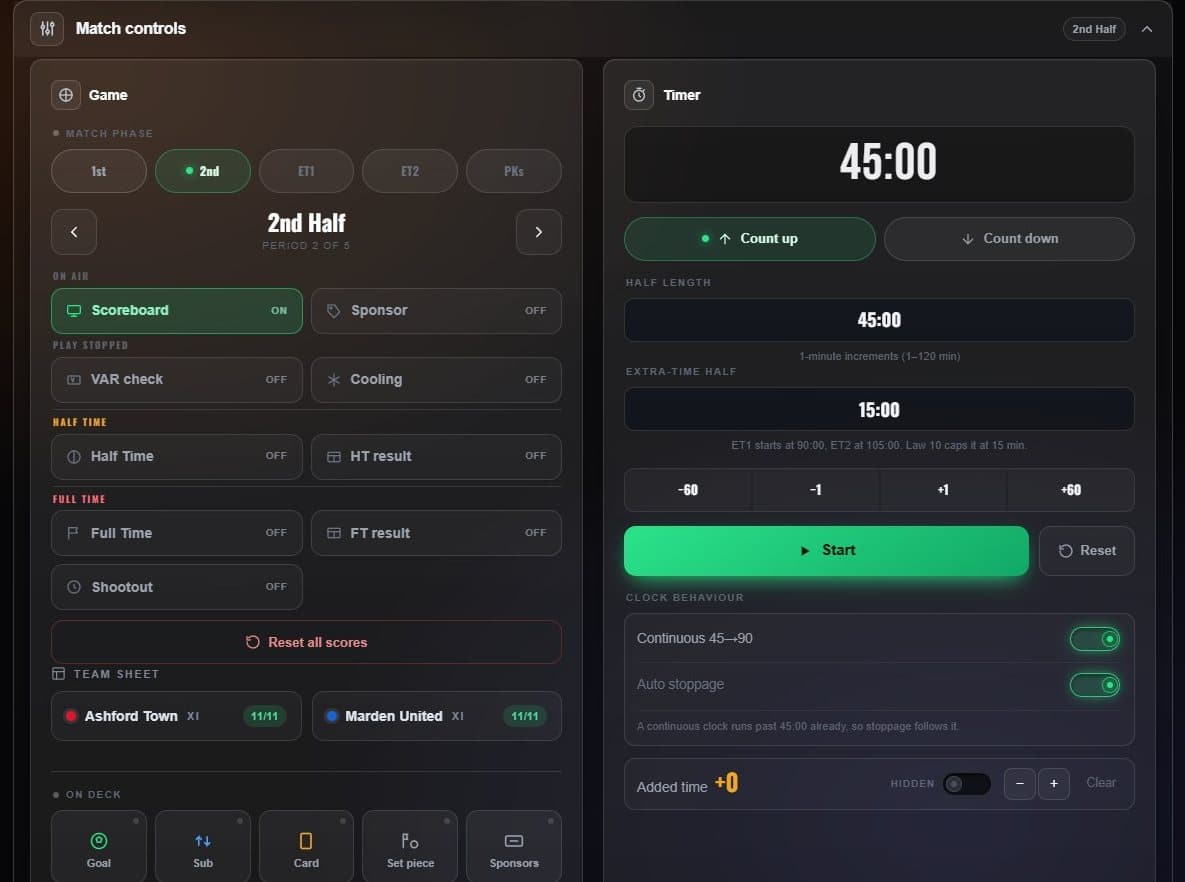
- Match phase Jump straight to a period: 1st, 2nd, extra time, penalties.
- Scoreboard on air Takes the whole scorebug off air and back.
- Half time Marks the break and stops the clock.
- Count up or down With the period length and extra-time length below.
- Start Starts the clock. ±1 and ±60 nudge it.
- Added time The +N capsule, with its own on-air switch.
Soccer’s continuous clock
With Continuous 45→90 on, the second half counts on from 45:00 instead of restarting, and extra time carries on 90 → 105 → 120. Auto stoppage keeps the clock running past the half as injury time, shown separately on the scorebug.
Other sports
- Basketball has a shot clock and football a play clock, with one-tap resets (24/14 and 40/25) beside the scoring buttons.
- Hockey runs three periods, then OT and a shootout, with an Intermission instead of half time.
- Baseball and tennis have no clock: innings and sets take its place.
The clock runs on the server, not in your browser, so closing the laptop lid does not stop it on air.